-How
To Install Goldpoint 24-Position
Stepped Attenuators and Selector
Switches: -How
To Install Goldpoint 24-Position
Stepped Attenuators and Selector
Switches: |
| The front
metal sections
of Goldpoint 12 and 24 position
rotary switches were ingenuously designed
in Switzerland
or Germany around 1960. A protruding, pointed tab
(labeled "Locking Key"
below) was
employed as an anti-rotation
feature. This works great, but
entails a
little bit more attention to
mounting these units on a panel than
simply drilling a hole and
tightening a hex nut. Very
Important! The
most common error made when installing
one of these units is to fail
to: |
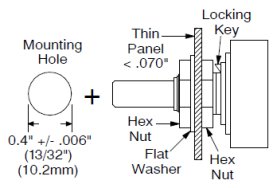
| 1) Use a second hex nut
inside the mounting panel - as shown
in Mounting
Method
#1. |
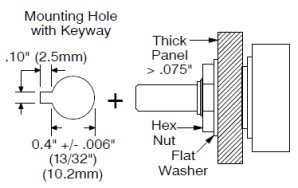
| 2) Or cut or file a
channel (keyway in the panel) for the
locking key to
fit into - as shown in Mounting
Method #2. |
3) Or file off the
protruding locking key - Mounting
Method #3. This is usually OK because
our audio stepped attenuators and selector
switches have a lot less turning
torque than the original switches in
the 1960s, so you don't really need
the locking key now. (While filing
off the protruding key, clamp the
switch shaft (only) in a large,
stable vise.)
|
|
|
| Mounting
Method 1:
If the panel you are mounting to
is thin: up to 0.07", (1/16"),
(1.5
mm),
you can mount the unit using two
hex nuts and a flat washer. This is the
preferred and easiest mounting
method. |
| Important: Never
allow the tip of the locking
key to touch the inner hex nut
- doing so
could warp
and damage the unit. |
|
|

|
|
|
|
| Mounting
Method 2:
If the panel is thicker than
0.07", up to 0.255" (6.5mm),
mount the unit with only one hex
nut
and a flat washer. Make
a notch in the mounting
hole - as shown at left under "Mounting
Hole with Keyway". |
| Important: Never
allow the locking key tip to
touch the inside of the
mounting panel -
doing
so could warp and damage the
unit. |
| Mounting
Method 3: File
off the protruding locking key -
whether the mounting panel is thin
or thick. Mount in round hole, no
notch, with one or two hex nuts
and a
flat washer - as
shown at left. Before filing, wrap
the rest of the unit with kitchen
plastic wrap to ensure the filings
do not get into the switch
contacts. |
|
|
Mounting
Hole for Goldpoint
47-Position Stepped Attenuators:
|
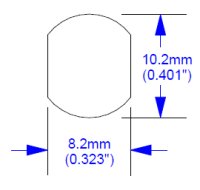 |
Our
47-Position stepped attenuators
use a "Double-D"
panel cutout as an anti-rotation feature.
However,
because
our rotational torque is fairly
low, you can simply mount them
into a
round hole (diameter
= 0.401" or
10.2mm).
If you use a round hole,
place a lock-washer on the
threaded
bushing before
sliding it into the front panel or put
a flat
washer under the hex
nut on the outside of the front
panel.
Maximum
panel thickness is about 0.255"
(6.5mm) if you mount the
attenuator with a hexnut and one
flat washer. |
|
|
| Mounting
Data in Acrobat PDF file |
|